Too loud and flat? A second master that keeps the dynamics
When loudness flattens a track, Echoteka can offer a second master: a little quieter, with more of the dynamics kept. Here is how to use it.
Loud and alive are not the same thing. A master can reach the streaming loudness target and still sound flat, with the drums squashed and the quiet parts gone. Echoteka now checks for that case. When loudness has cost too much of a track's dynamics, the result page offers a second version: a little quieter, with more of the movement kept.
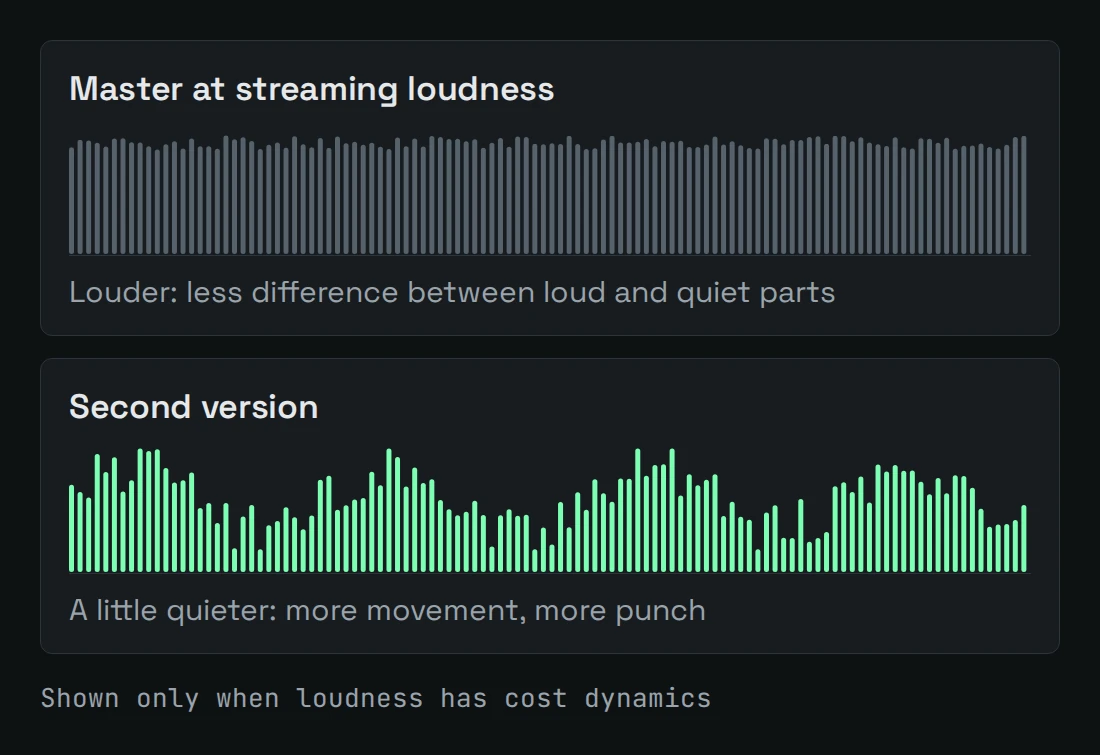
Why a loud master can sound flat
Loudness and dynamics pull against each other. The louder the target, the more the peaks have to be held down. Kick and snare lose their punch, and the quiet parts lose their life. The meter can still show the right number while the track sounds tired. Streaming services also turn loud tracks down, so pushing the level further gives you less than it seems. For the numbers behind this, read the loudness war in 2026 streaming.
What the second version is
- It appears only when it is needed. If your master kept its movement, there is nothing to offer, and no second version shows up.
- It is a separate file. The main master stays as it was, and so does its token charge.
- The offer tells you two things: how much quieter the second version is, in LU, and how much more dynamics it keeps, in dB.
- It lives with the result. You can listen to it and download it for as long as the main result is kept.
How to use it
- Master your track in the lab as usual.
- When the block "Dynamics-preserving version" appears under the result, press Listen.
- Compare the two. Play the main master and the second version one after the other, on the same headphones or speakers.
- Download the version you prefer. Some tracks keep their punch best at full loudness, and others sound better a touch quieter.
The second version never replaces your master. It sits next to it, and the choice is always yours.
Check the loudness first
If you want to see the level before you master, the free LUFS checker shows integrated loudness, true peak and loudness range. To learn what those numbers mean, read how to read a LUFS meter.
Master your track free
1 full master every day, no account needed. Upload a WAV or MP3 and get a streaming-ready master with a before/after report.
Master a track free